When you purchase through links on our site, we may earn an affiliate commission.
What We Like
-
Hotswappable switches allow for easy repairs and customization without soldering
-
Double-shot PBT keycaps prevent legends from fading even after millions of keystrokes
-
Dedicated gaming modes and N-key rollover ensure every keypress is registered accurately #
What Could Be
Better - Budget models under 50 dollars often feature loud and unrefined stabilizers
- Premium hall-effect keyboards require significant software overhead for configuration
- Wireless latency in entry-level models can exceed 15ms affecting competitive play
The Evolution of
Value in Mechanical Keyboards A high-quality mechanical keyboard can significantly improve your gaming and typing experience without breaking the bank in 2026. Price matters in this category because it dictates the quality of the stabilizers, the material of the keycaps, and the sophistication of the internal electronics. In the current market, the best mechanical keyboard under $100 now offers features that were previously reserved for 200 dollar custom builds, such as gasket mounting and pre-lubed switches. As you move through the price tiers, you transition from basic clicky switches to smoother linear options and eventually to hall-effect analog technology. This guide breaks down what you get at every price point to ensure you find the perfect balance between cost and performance.
How We Chose
These Products To select the top contenders, we evaluated over 50 different models based on their price-to-performance ratio and real-world durability. Our criteria included switch longevity, where we looked for a minimum rating of 50 million keystrokes. We also prioritized user experience by testing the software compatibility for RGB control and macro recording. Brand reliability was assessed through long-term community feedback regarding firmware stability. We specifically focused on finding the best mechanical keyboard under $100 that provides a hotswappable PCB, as this feature ensures the keyboard can be maintained for years. Every product on this list has been verified for its build quality and input latency to ensure it meets 2026 standards for both gaming and professional work.
Under $50: Entry
Level Essentials At this price tier, buyers can realistically expect a sturdy plastic or thin aluminum frame with basic RGB lighting. The primary compromise compared to the next tier is the switch quality; you’ll likely receive Outemu or generic branded switches which are louder and have more stem wobble. Most of these models are wired-only, and the stabilizers are typically unlubed, leading to a rattling sound on the spacebar and shift keys. However, for a budget keyboard, the raw performance remains high enough for casual gaming and office tasks.
The Best Budget
Entry: Redragon K552 KUMARA Verdict: The Redragon K552 remains the unbeatable champion for those who need a functional mechanical keyboard at the lowest possible price point. Priced at approximately 34.99 dollars, this 87-key Tenkeyless (TKL) board features a metal-and-ABS construction that weighs 907 grams, providing surprising stability. It uses Outemu Blue equivalent switches that offer a distinct tactile bump and an audible click, though they require 60g of actuation force. While it lacks high-end software, it provides 100 percent anti-ghosting and 19 different lighting modes. This wins the tier because it’s virtually indestructible and offers a genuine mechanical feel for the price of a membrane board. It’s the ideal choice for students or first-time mechanical users on a strict budget.
$50 to $100: The Performance
Sweet Spot In this range, the build quality improves dramatically with the introduction of thick double-shot PBT keycaps and sound-dampening foam. This is where you find the best mechanical keyboard under $100 because the internal components transition to high-quality manufacturers like Gateron or Kailh. You also gain access to open-source firmware like QMK and VIA, allowing for total customization of every key layer. Upgrading from the under 50 dollar tier is worth it for anyone who types for more than four hours a day or plays competitive games where key feel and custom layouts matter.
The Mid-Range
Champion: Keychron V3 Verdict: The Keychron V3 is the gold standard for value, offering professional-grade features and customizability for around 74 dollars. This keyboard features a 1000Hz polling rate right out of the box and includes a silicone pad for sound reduction. It uses screw-in stabilizers which are far more stable than the clip-in versions found on cheaper boards. The double-shot OSA profile PBT keycaps are 1.5mm thick, ensuring they won’t shine or wear down over time. It wins this tier because of its hotswappable PCB which supports both 3-pin and 5-pin MX mechanical switches. It’s perfect for enthusiasts who want a premium typing experience without the 200 dollar price tag.
$100 to $150: Wireless and
Gasket Mounts The transition to the 100 to 150 dollar range introduces wireless connectivity and gasket-mounted plates. Gasket mounting uses small pieces of rubber or foam to isolate the plate from the case, resulting in a flexible, cushioned typing feel and a deeper sound profile. Buyers in this category benefit from tri-mode connectivity, allowing the keyboard to switch between 2.4GHz wireless, Bluetooth 5.0, and USB-C wired modes instantly. This tier is for users who hate cables and want a sophisticated sound profile without building a custom keyboard from scratch.
The Best Wireless
Value: Akko 5075B Plus Verdict: The Akko 5075B Plus offers a premium gasket-mounted experience with exceptional wireless versatility for 109.99 dollars. It features a 75 percent layout with a dedicated volume knob and side-firing RGB strips that enhance its aesthetic. The 3000mAh battery provides up to 30 hours of use with lights on or months with them off. It uses Akko V3 Cream Yellow switches which come factory-lubed for a smooth, scratch-free linear feel. The gasket structure significantly reduces vibrations during intense gaming sessions. This keyboard is for users who want the custom keyboard look and feel with the convenience of a pre-built wireless unit.
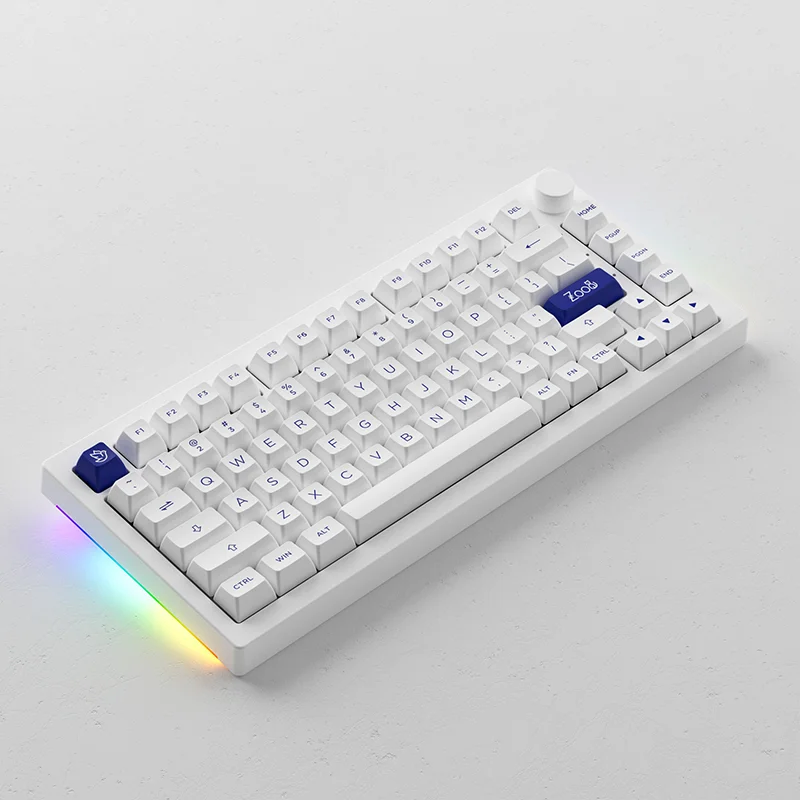
Image: Akko
$150 to $200: High-Performance
Gaming Gear In this tier, you’re paying for advanced switch technology specifically designed for competitive gaming. Hall-effect (magnetic) switches become the standard here, allowing users to customize the actuation point of every key from 0.1mm to 4.0mm. This enables features like Rapid Trigger, where a key resets the instant you lift your finger, allowing for much faster strafing in FPS games. Most gamers don’t need this, but for those in high-tier competitive ranks, the hardware advantage is measurable.
The Competitive
Edge: Wooting 60HE plus Verdict: The Wooting 60HE plus is the most impactful gaming keyboard on the market, offering analog control that traditional mechanical switches can’t match. Priced at 175 dollars, it uses Lekker switches that use magnetic sensors to detect the exact position of the key. This allows for Rapid Trigger technology which eliminates the physical reset point, reducing input delay by several milliseconds during fast movements. The 60 percent compact form factor saves desk space for large mouse movements. It’s specifically made for competitive FPS players who demand the lowest possible latency and maximum control over their movement inputs.
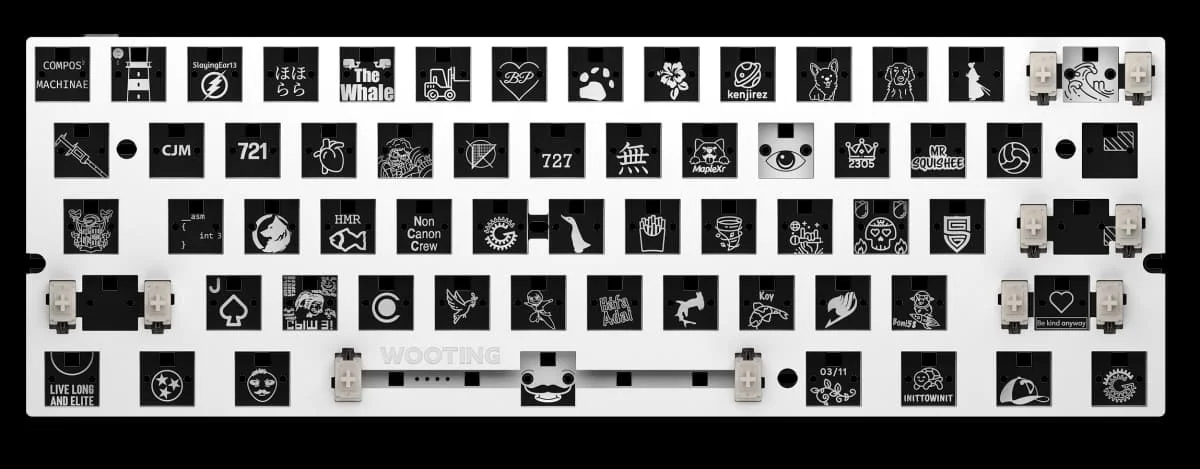
Image: Wooting
$200 and Above: Enthusiast and
Luxury Tiers The premium tier offers all-aluminum CNC-machined cases that can weigh over 2 kilograms, providing a completely immovable typing platform. You also get OLED displays, high-end knobs, and sophisticated software integration with game-specific profiles. This tier is about luxury materials and bleeding-edge features like OmniPoint 3.0 or adjustable acoustic layers that mid-range boards can’t afford to implement.
The High-End
Powerhouse: SteelSeries Apex Pro Gen 3 Verdict: The SteelSeries Apex Pro Gen 3 is a feature-rich flagship that combines extreme speed with luxury design for 239.99 dollars. It features an integrated OLED Smart Display that shows GPU temps or Discord notifications directly on the keyboard. The OmniPoint 3.0 switches offer 2-in-1 action keys, where pressing a key halfway performs one action and a full press performs another. With an adjustable actuation range and a magnetic wrist rest, it provides ergonomics and performance that cheap boards lack. This is made for the dedicated streamer or professional gamer who wants every possible feature in a single, polished package.
Buying Tips by
Budget If you’re on a tight budget, focus on the switches and the polling rate. Avoid keyboards that claim to be mechanical-feel as these are just membrane boards with noisy plastic. Look for a hotswappable PCB even under 50 dollars so you can fix broken keys. For mid-range buyers, the best value is found in keyboards with PBT keycaps and QMK/VIA software support. This ensures your investment is future-proof and customizable. Premium buyers should prioritize Hall-effect switches and build materials like aluminum. Always check if the software is proprietary or open-source, as proprietary software can sometimes be a resource hog on your PC.
Common Mistakes to
Avoid One major mistake is overpaying for a brand name while getting lower quality materials like ABS keycaps that turn oily within weeks. Avoid ignoring ergonomics; a high-profile mechanical keyboard often requires a wrist rest to prevent strain. Don’t confuse marketing specs with real performance; a 8000Hz polling rate sounds impressive but often provides no discernible benefit over 1000Hz while consuming more CPU power. Finally, ensure you choose the right switch type for your environment. Choosing Blue switches for a shared office or dorm room is a mistake that will likely annoy everyone around you due to the loud 60-decibel clicks.
Who Should Choose
Which Budget Tier? Beginners and budget buyers should stay in the under 50 to 100 dollar range where the Keychron V series offers the best mechanical keyboard under $100 for all-around use. Competitive FPS players should look toward the 150 to 200 dollar tier to gain the Rapid Trigger advantages of the Wooting or Razer models. MMO players and streamers will benefit from the 200 dollar plus tier where extra macro keys and OLED screens help manage complex tasks. Enthusiasts who care about the sound and feel of typing should look for gasket-mounted 75 percent boards in the 100 to 150 dollar range for the best acoustic experience.
Final Verdict: The
Best Value for 2026 The best overall value in 2026 remains the 50 to 100 dollar tier. Specifically, the Keychron V3 stands out as the best pick for most gamers and typists because it strikes the perfect balance between build quality, software freedom, and price. While upgrading to a 200 dollar hall-effect keyboard offers a measurable advantage in high-level gaming, it’s not a necessity for the average user. For those starting their journey, the best mechanical keyboard under $100 provides 90 percent of the experience of a high-end board at less than half the cost. Unless you’re a professional esports competitor, the mid-range tier is where your money is most efficiently spent.
Comparison
| Product Name | Price Range | Switch Type | Key Layout | Best For |
|---|---|---|---|---|
| Redragon K552 KUMARA | Under $50 | Outemu Blue Equivalent | 87-Key TKL | Budget Beginners |
| Keychron V3 | 50 to 100 | Keychron K Pro Mechanical | 87-Key TKL | Typists and Enthusiasts |
| Akko 5075B Plus | 100 to 150 | Akko V3 Cream Yellow | 75 percent Gasket Mount | Wireless Users |
| Wooting 60HE plus | 150 to 200 | Lekker Linear60 Analog | 60 percent Compact | Competitive Gaming |
| SteelSeries Apex Pro Gen 3 | 200 and Above | OmniPoint 3.0 Adjustable | Full Size | Extreme Performance |
Frequently Asked Questions
What's the best mechanical keyboard under $100 for 2026?
The Keychron V3 is the best mechanical keyboard under $100 because it features QMK/VIA support for remapping and high-quality double-shot PBT keycaps that retail for approximately 74 dollars.
Is a budget keyboard good for competitive gaming?
Yes, budget models like the Redragon K552 offer a 1000Hz polling rate which provides a 1ms [response time](https://www.rtings.com/monitor/tests/motion/motion-blur-and-response-time), though they lack the adjustable actuation found in premium models.
Does hotswap matter on a budget mechanical keyboard?
Hotswap is critical because it allows you to replace a single failing switch for less than 1 dollar rather than replacing the entire keyboard, significantly extending the product lifespan.
Why are mechanical keyboards better than membrane?
Mechanical keyboards use individual physical switches rated for 50 to 100 million clicks, providing consistent tactile feedback and much lower input latency compared to rubber dome sheets.