When you purchase through links on our site, we may earn an affiliate commission.
[Corsair K70
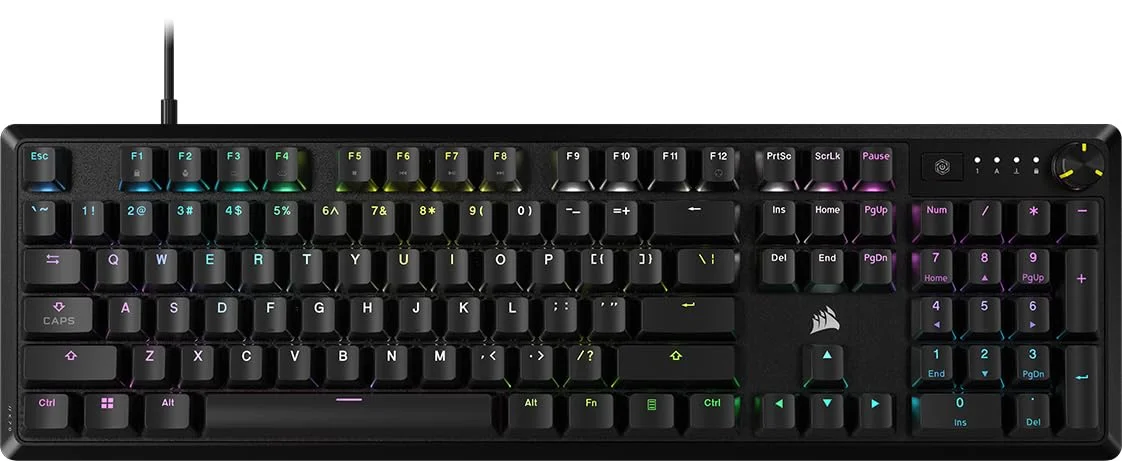
MAX](https://www.amazon.com/s?k=Corsair+K70+MAX&tag=ggl05b-20) RGB Magnetic Mechanical Gaming Keyboard Review: An In-Depth Analysis In the hyper-competitive world of gaming peripherals, true innovation is rare. Corsair, a titan in the industry, aims to deliver just that with its latest flagship keyboard. This comprehensive Corsair K70 MAX review dives deep into a product that isn’t just an iteration, but a technological leap forward. Featuring latest magnetic mechanical switches, an 8000Hz polling rate, and the solid build quality the K70 line is known for, the MAX promises top-tier customization and speed. We’ll dissect its design, features, and real-world gaming performance to determine if it truly . This keyboard is primarily for the serious, competitive gamer who demands granular control and the absolute lowest latency, but it also packs features that tech enthusiasts will adore.
Key Takeaways
For those in a hurry, here’s the bottom line on the Corsair K70 MAX RGB: * Game-Changing Customization: The MGX magnetic switches allow for per-key adjustable actuation points from a hyper-sensitive 0.4mm to a deliberate 3.6mm, along with a Rapid Trigger mode for unmatched responsiveness in FPS games.
- Premium Construction: It features a rock-solid, aircraft-grade aluminum frame, durable PBT double-shot keycaps, and includes a supremely comfortable magnetic memory foam wrist rest.
- Top-Tier Performance Specs: Corsair’s AXON Hyper-Processing Technology enables a true 8000Hz polling rate, drastically reducing input latency to a theoretical 0.125ms.
- Powerful but Complex Software: The iCUE software unlocks the keyboard’s full potential, including dual-action keypresses and complex RGB lighting, but it comes with a significant learning curve for newcomers.
Product Overview
The Corsair K70 MAX RGB is a full-size magnetic mechanical gaming keyboard. It sits at the apex of Corsair’s keyboard lineup, targeting esports professionals, competitive gamers, and hardware enthusiasts who want the latest and greatest technology. Its defining feature is the move away from traditional mechanical switches to Corsair’s new MGX magnetic switches. This technology uses Hall effect sensors to detect the precise position of a key throughout its press, rather than a simple on/off binary signal. This allows for a level of customization previously seen only in niche, enthusiast-grade keyboards. It represents a major evolution from previous K70 models, which used standard Cherry MX mechanical switches, by placing total control over key feel and response directly into the user’s hands.
Design & Build Quality
Corsair has maintained the iconic K70 design language, which is a significant strength. The keyboard is built around a beautiful, brushed aircraft-grade aluminum top plate that gives it substantial heft and zero deck flex. It feels incredibly durable and premium. The keycaps are high-quality PBT plastic with a double-shot molding process, meaning the legends will never fade or wear away. Aesthetically, it’s a clean, impressive-looking board with stunning, vibrant per-key RGB lighting that shines brightly without excessive light bleed. The inclusion of a detachable, plush memory foam wrist rest that connects magnetically is a massive ergonomic win, providing excellent support for long gaming sessions. The full-size layout includes dedicated media keys and Corsair’s signature textured metal volume roller, which remain as useful as ever. A modern, detachable braided USB-C cable is a welcome update, enhancing portability and durability.
Features & Technology
The Corsair K70 MAX RGB features are what truly set it apart. The star of the show is the Corsair MGX Magnetic Switches. These linear-style switches allow you to set the actuation point for every single key, anywhere from 0.4mm to 3.6mm, in tiny 0.1mm increments. This means you can have WASD keys actuate with a feather-light touch for quick movement, while ability keys require a more deliberate press to avoid misfires. Another crucial feature is Rapid Trigger, which resets a key the instant it starts traveling upwards, rather than waiting for it to pass a fixed reset point. This enables incredibly fast repeated keystrokes, a noticeable advantage in rhythm games and FPS titles that require stutter-stepping. The keyboard also supports Dual-Action Keypresses, letting you assign two different functions to one key—one for a half-press and another for a full bottom-out press. All of this is powered by Corsair AXON Hyper-Processing Technology, which delivers inputs to your PC at an 8000Hz polling rate, minimizing latency to a level imperceptible to humans. Onboard storage allows you to save up to 50 complex profiles directly to the keyboard.
Performance
In real-world gaming, the Corsair K70 MAX’s performance is nothing short of exceptional. In fast-paced FPS games like Valorant and Counter-Strike 2, the combination of a low actuation point (e.g., 0.8mm) and Rapid Trigger mode is transformative. Counter-strafing feels instantaneous and more precise, as the keys reset the moment you release pressure, allowing for immediate directional changes. For MMOs like World of Warcraft or Final Fantasy XIV, the Dual-Action Keypresses feature is a powerful tool. You could, for instance, set a key to use a self-buff on a half-press and a major offensive cooldown on a full-press, effectively consolidating your keybinds. The 8000Hz polling rate is difficult to perceive directly, but it provides peace of mind that there’s absolutely no hardware-induced latency bottlenecking your reaction time. For typing, the linear MGX switches are smooth and consistent, though the extreme sensitivity at lower actuation settings can take some getting used to and may lead to more typos initially. This is a keyboard that meaningfully improves your gaming experience by giving you tools to fine-tune its response to your exact playstyle.
Comfort & Usability
Long-term use is a pleasure thanks to the excellent ergonomics. The magnetic memory foam wrist rest is one of the best included with any keyboard, providing soft yet firm support that significantly reduces wrist fatigue during marathon gaming sessions. The keyboard features two sets of flip-out feet, offering three distinct typing angles to suit your preference. The full-size layout is spacious, and the standard bottom row means finding custom keycap sets is easy if you wish to personalize it further. The setup process is simple: plug in the USB-C cable and it works immediately. However, to access the advanced features that make this keyboard special, installing the Corsair iCUE software is mandatory. The weight of the aluminum chassis keeps it firmly planted on the desk, with no sliding around during intense moments.
Software & Customization
The it is controlled by the Corsair iCUE software suite. ICUE is an incredibly powerful, all-in-one tool for controlling lighting, macros, key assignments, and performance settings. It’s here that you’ll adjust the per-key actuation points and set up dual-action commands. The interface for adjusting the actuation is surprisingly intuitive, with a simple slider for each key. RGB customization is arguably best-in-class, with endless layering options, effects, and integrations with games and other applications. You can create incredibly detailed macros and save everything to hardware profiles for use on any PC without the software running. The primary downside is that iCUE can be intimidating for beginners due to its sheer number of options, and it can be more resource-heavy than competing software. However, for a power user, the level of control it offers is unmatched.
Technical Specifications
| Feature | Specification |
|---|---|
| Dimensions | 442mm x 166mm x 39.2mm |
| Weight | 1.12 kg / 2.47 lbs |
| Switch Type | Corsair MGX Magnetic-Mechanical (Linear) |
| Actuation Point | Adjustable 0.4mm – 3.6mm (0.1mm increments) |
| Polling Rate | Up to 8,000Hz with Corsair AXON |
| Keycaps | PBT Double-Shot |
| Connectivity | Wired (Detachable USB 3.0 Type-C to Type-A cable) |
| Onboard Memory | 8MB (Up to 50 profiles) |
| Wrist Rest | Detachable Magnetic, Memory Foam |
| Price Range | $229.99 USD / €239.99 |
Pros & Cons
No product is perfect. Here’s a breakdown of the MAX RGB pros and cons.
Pros * Top-tier
Switch Customization: Adjustable actuation, Rapid Trigger, and dual-action keypresses provide a level of control few competitors can match.
- Exceptional Build Quality: The aircraft-grade aluminum frame and PBT keycaps feel incredibly premium and are built to last.
- Top-Tier Gaming Performance: An 8000Hz polling rate and ultra-responsive switches give a tangible competitive edge.
- Superb Comfort: The included magnetic memory foam wrist rest is best-in-class.
- Powerful Software Features: iCUE offers deep customization for lighting, macros, and performance settings.
Cons * Premium Price
Tag: This is one of the more expensive gaming keyboards on the market.
- Complex Software: iCUE can be overwhelming for new users and is required to access the keyboard’s best features.
- Full-Size Footprint: The large form factor may not be suitable for gamers with limited desk space.
Price & Value for Money
Priced at around $229.99, the Corsair K70 MAX RGB is firmly in the high-end, enthusiast category. It competes directly with other premium magnetic keyboards like the SteelSeries Apex Pro and Wooting two HE. While the price is steep, the value proposition is strong for the target audience. You’re paying for latest switch technology that offers a demonstrable performance advantage, combined with a premium physical build that will last for years. For a competitive gamer who plays FPS or rhythm games at a high level, the cost can be justified as an investment in their performance. For casual gamers or those on a budget, the features may be overkill, and the value diminishes. Ultimately, the K70 MAX offers good value if, and only if, you plan to use its deep customization features.
Best Alternatives
If the Corsair K70 MAX isn’t quite right for you, consider these excellent alternatives:
-
SteelSeries Apex Pro TKL: A direct competitor featuring its own adjustable OmniPoint 2.0 switches. It offers a similar level of actuation customization and comes in a more compact Tenkeyless (TKL) form factor, which many FPS players prefer. Its software is often considered slightly more user-friendly.
-
Wooting 60HE: The keyboard that brought analog input and Rapid Trigger to the mainstream. It offers industry-leading performance in a compact 60% layout. It’s often favored by purists who want the absolute best performance for FPS games without the bells and whistles of a full-size board.
-
Razer Huntsman V3 Pro: Razer’s answer to the magnetic switch trend, using analog optical switches. It also features Rapid Trigger and adjustable actuation, backed by Razer’s solid Synapse software and ecosystem. It’s a great choice for those already invested in Razer products.
Who Should Buy It?
This keyboard is not for everyone, but for specific users, it’s a perfect match:
-
Competitive FPS Gamers: You’re the primary audience. The Rapid Trigger functionality and customizable, low actuation points will provide a noticeable advantage in movement-heavy games.
-
Tech Enthusiasts: If you love having the latest technology and enjoy tweaking settings to perfection, the K70 MAX is a tinkerer’s dream.
-
High-Budget Gamers: If you simply want one of the best, most feature-rich keyboards available and price is not a major concern, this is a top-tier choice.
-
Users Upgrading from an Old K70: If you love the K70 design but want a massive leap in performance and technology, this is the logical and most powerful upgrade path.
Final Verdict
After an extensive analysis, this Corsair K70 MAX review concludes that it’s an outstanding piece of engineering and one of the best magnetic mechanical gaming keyboards on the market today. Its overall performance is flawless, driven by the incredibly versatile MGX switches and the lightning-fast 8000Hz polling rate. Its best features are undoubtedly the deep switch customization options—Rapid Trigger, adjustable actuation, and dual-action keypresses—which provide a real competitive edge. The main weak points are its high price and the complexity of its software. This keyboard will be loved by competitive gamers, hardware enthusiasts, and anyone who refuses to compromise on performance. If you’re a serious gamer looking for a tool to help you reach your peak potential, the MAX RGB is absolutely worth buying in 2025 and beyond. It’s a premium product that delivers a truly premium experience.
Frequently Asked Questions (FAQ) Is the Corsair K70 MAX good for FPS games?
Yes, it’s exceptional for FPS games. The Rapid Trigger feature allows for faster and more precise movement techniques like counter-strafing, and the ability to set a very low actuation point makes keys feel incredibly responsive. What’s the difference between the K70 MAX and the K70 CORE? The main difference is the switch technology. The K70 MAX uses advanced magnetic switches with adjustable actuation and Rapid Trigger. The K70 CORE uses more traditional, non-adjustable Red linear mechanical switches, making it a more budget-friendly option. Is the Corsair K70 MAX worth the upgrade from an older K70 keyboard? If you have an older K70 with standard Cherry MX switches, the upgrade to the K70 MAX is significant. The magnetic switch technology is a genuine leap forward in performance and customization. If you’re a competitive player, the upgrade is worth considering. How hard is it to set up the dual-action keypresses? Setup requires the Corsair iCUE software. While there’s a learning curve to the software as a whole, the specific interface for setting up dual-actions is relatively straightforward. You simply select a key, enable the feature, and assign commands to the two actuation stages. Can you change the keycaps on the K70 MAX? Yes. The Corsair MGX switches use an MX-compatible stem, and the keyboard has a standard bottom row layout. This makes it compatible with the vast majority of third-party custom keycap sets.